
1
2
3
4
5
6
7
8
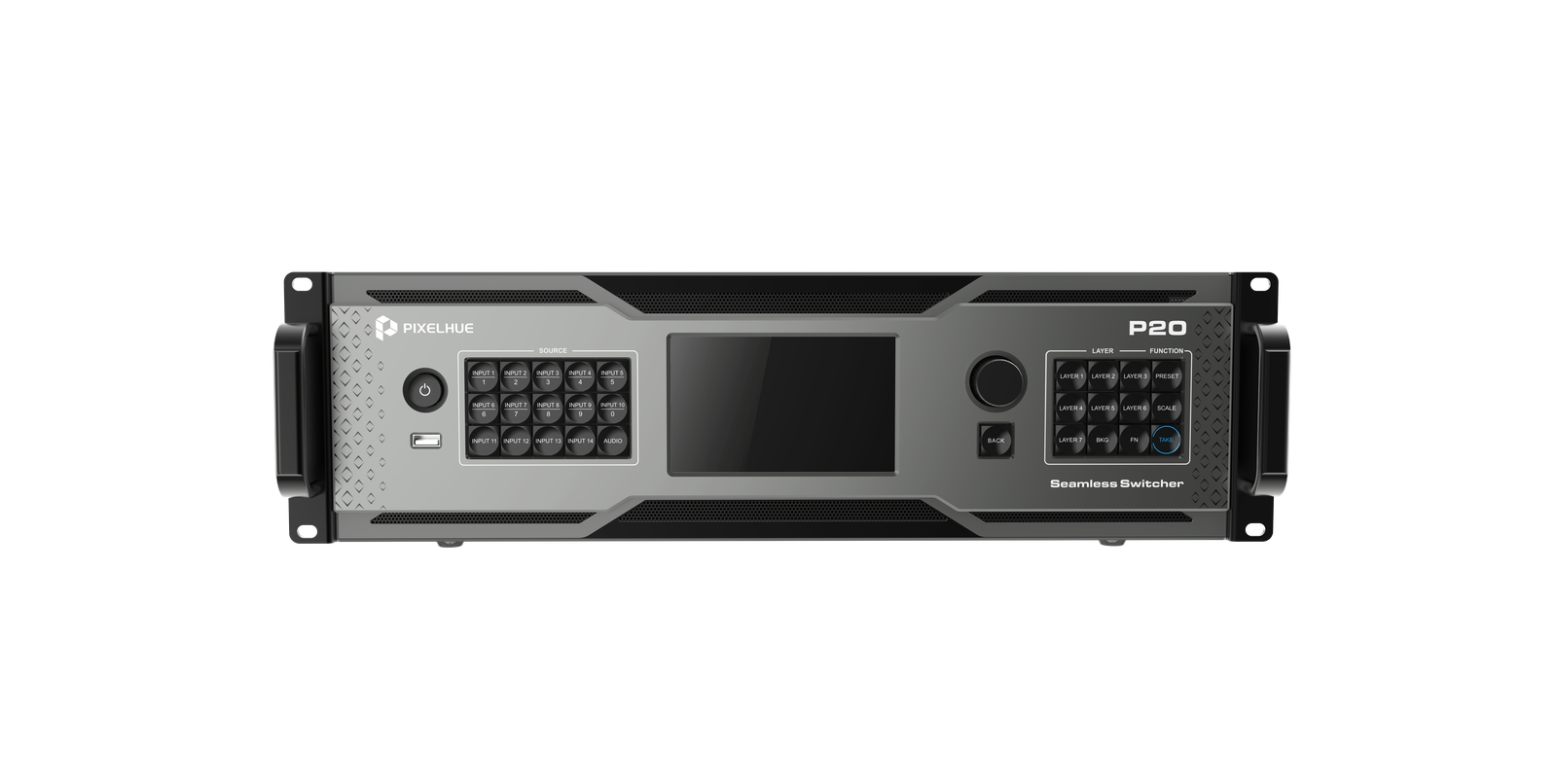
The Pixelhue P20-DS is the broadcast / pro-audio variant of the P20. Same chassis, same compositing engine, same control surface — slot 3 swaps in the P_12G SDI Audio-OPT combo card that adds 4x 12G-SDI outputs and a 32x32 Dante AES67 audio interface (dual-redundant Gigabit Ethernet). The 4x 12G-SDI outputs copy the HDMI program (one per output group) and are backward-compatible to 6G/3G/HD/SD-SDI. Analog 3.5 mm audio is enabled on DS (P10/P20 reserve it for future firmware), with EDID-level audio enable/disable on every input and output. Inputs are the same as P20: 8x DP 1.2 / HDMI 2.0 (selectable per input) plus 4x 12G-SDI with loop, all supporting dual-channel embedded audio at 24-bit / 48 kHz. Outputs are organized into 4 groups, each with 2x HDMI 2.0 + 1x 12G-SDI + 2x OPT, all carrying the same program. 12-layer compositing (2x MAIN DL + 10x PIP DL, or 4x MAIN DL + 4x PIP DL). Advanced DSK keying — Smart key, Luma key, and Chroma key. Integrated multiviewer, real 4K60p 4:4:4 8/10/12-bit FPGA processing, BKG/LOGO storage, 4x AUX outputs, dual Gigabit Ethernet control, Genlock, up to 128 stored presets. The P20-DS ships at 10.7 kg net. Choose the P20-DS when you need broadcast SDI program outputs, Dante audio networking, or working analog audio embedding.
What is a PGM? “PGM” is short for Program — the finished, composited video the switcher sends out to a display. Each PGM is a complete signal you can route to an LED wall, a confidence monitor, or a downstream device.
How many unique PGMs does the P20 produce? Two. The layer engine composites your sources into PGM 1 and PGM 2. Those two unique programs are then distributed across the eight HDMI 2.0 outputs:
Why copies? The duplicate outputs let you feed up to four displays per program without an external HDMI splitter — useful for redundancy, confidence monitors, recording, or driving multiple LED processors from the same program.
Authoritative connector + behavior reference, sourced from the official Pixelhue user manual (V2.0.0). Tap any section to expand.
The P20-DS slot 3 holds the P_4K_12G SDI Audio-OPT Combo Card, which provides:
The remaining seven slots are identical to the P20:
The P20-DS organizes its outputs into 4 groups, each with 2× HDMI 2.0 + 1× 12G-SDI + 2× OPT. All connectors within a group carry the same image — the HDMI pair, the SDI, and the OPT pair all output the same program at the same resolution:
Group behavior depends on the layer mode:
When an HDMI 2.0 connector is set to a custom resolution, its matching 12G-SDI connector does not output. The 12G-SDI outputs have no HDR or EDID management.
| OPT 1 | copies left half of HDMI 1 |
|---|---|
| OPT 2 | copies right half of HDMI 1 |
| OPT 3 | copies left half of HDMI 1 |
| OPT 4 | copies right half of HDMI 1 |
| OPT 5 | copies left half of HDMI 5 |
| OPT 6 | copies right half of HDMI 5 |
| OPT 7 | copies left half of HDMI 5 |
| OPT 8 | copies right half of HDMI 5 |
| OPT 1 | copies left half of HDMI 1 |
|---|---|
| OPT 2 | copies right half of HDMI 1 |
| OPT 3 | copies left half of HDMI 3 |
| OPT 4 | copies right half of HDMI 3 |
| OPT 5 | copies left half of HDMI 5 |
| OPT 6 | copies right half of HDMI 5 |
| OPT 7 | copies left half of HDMI 7 |
| OPT 8 | copies right half of HDMI 7 |
| OPT 1 | copies HDMI 1 |
|---|---|
| OPT 2 | copies HDMI 1 |
| OPT 3 | copies HDMI 3 |
| OPT 4 | copies HDMI 3 |
| OPT 5 | copies HDMI 5 |
| OPT 6 | copies HDMI 5 |
| OPT 7 | copies HDMI 7 |
| OPT 8 | copies HDMI 7 |
1× HDMI 1.3 dedicated to the Multiviewer. Plug a monitor in here and it shows a tiled grid of every input source plus PVW and PGM thumbnails — so the tech at front-of-house can see what's coming in and what's about to go live, all on one display.
The MVR feed never goes to the LED wall. It's a confidence-monitor feed only. Pick from the built-in layout templates; custom MVR layouts are a P80/Q8 feature.
4× HDMI 1.3 AUX outputs. Each AUX is its own second program-style output with its own layer engine — pick any input source, PVW, or PGM and stage it independently of what's on the main LED wall.
Typical destinations: teleprompters, stage-side confidence monitors, lobby displays, ISO recorders, streaming encoders, or a separate room. AUX layers can be scaled, cropped, and positioned just like the main PGM layers.
For 1080p confidence monitoring, use the MVR output above. For up to 4 independent custom feeds (one per teleprompter, recorder, etc.), use these AUX outputs.
2× Gigabit Ethernet ports — for control and live input view. One works as primary, the other as backup; they share the same IP address and have the same function.
GENLOCK IN + LOOP — BNC sync signal input with a loop-through for daisy-chaining the reference to downstream devices.
IEC C14 inlet with a rocker switch. 100–240 V AC, 50/60 Hz.
Two LED work lights with red pushbutton switches on the rear panel — so you can see the connectors during load-in at a dim venue without pulling a flashlight.
| Model | P20-DS |
|---|---|
| Inputs | 8x DP 1.2 / HDMI 2.0 (selectable per input, dual-channel embedded audio) 4x 12G-SDI (dual-channel embedded audio) 2x line in (3.5 mm analog) + Dante audio (32x32 AES67, dual-redundant) |
| HDMI 2.0 Outputs | 8x HDMI 2.0 (max 4096x2160@60Hz, HDR, HDCP 2.2, dual-channel embedded audio) |
| 12G-SDI Output | 4x 12G-SDI outputs — copy HDMI outputs (one per output group). Backward compatible to SD/HD/3G/6G-SDI. No HDR, no EDID management. When the matching HDMI 2.0 connector is set to a custom resolution, the 12G-SDI does not output. |
| 10G OPT Fiber Output | 8x 10G SFP+ — copies HDMI outputs (group-based, paired with HDMI + 12G-SDI in each output group) |
| Dante Audio | 32x32 channels @ 48 kHz, AES67 compliant. Dual-redundant Gigabit Ethernet ports. Audio de-embedding / embedding on every input and output (raw audio); de-embedded channels can route to the Dante network and external Dante audio can be re-embedded for output. |
| Audio Embed/De-embed | Per-input and per-output, raw audio, routable to Dante |
| Layer Capacity | Up to 12 DL layers (2x MAIN + 10x PIP) or 8 DL layers (4x MAIN + 4x PIP) |
| Multiviewer | 1x HDMI 1.3 multiviewer — live thumbnails of all inputs + PVW + PGM. Default 1920x1080@60Hz, adjustable frame rate, multiple layout templates |
| Advanced Keying | Downstream Keying (DSK), Smart Key, Luma Key, Chroma Key |
| Image Processing | Real 4K60p 4:4:4 — 8 / 10 / 12-bit FPGA |
| Transitions | Seamless Take / Cut / T-bar, fade and cut effects |
| Multi-Screen | Virtual pixel mapping, mosaic, LCD bezel compensation, projector edge blending, Cut and Fill, multi-screen splicing for uneven divisions |
| Control | Front-panel keys + 5" LCD, PixelFlow software, U5 / U5 Pro console |
| Network | 2x Gigabit Ethernet (primary + backup, shared IP) |
| Sync | Genlock IN + LOOP |
| Best For | Broadcast, fixed install, Dante-equipped venues, productions needing 12G-SDI program out |
| AUX Outputs | 4x HDMI 1.3 — default 1920x1080@60Hz, max 2048x1152@60Hz, interlaced supported |
| Output Failover | Software fail-over: a damaged HDMI output can be replaced by a spare connector while the device is running |
| Backgrounds / Logos | BKG loadable from PC or event controller; capture from input or PGM as BKG with adjustable aspect, position, and size. LOGO storage included. |
| Compatibility | Mac mosaic compatibility, Mac EDID compatibility, antistatic protection with configurable duration |
| Audio Jacks | 4x 3.5 mm (2x line in + 2x line out) — analog audio working on P20-DS; reserved for future firmware on P10 / P20 |
| Net Weight | 10.7 kg (23.6 lbs); 26 kg with flight case |
| Dimensions | 482.6 x 501.0 x 139.0 mm (3U rack) |
| Flight Case Dimensions | 560 x 230 x 732 mm |
| Mount Orientation | Horizontal only — do not mount vertically or upside down |
| Rack Load Rating | At least 41.0 kg per mount; M5 x 12 screws (4) |
| Power | 100-240 V~, 50/60 Hz |
| Maximum Power Consumption | 160 W |
| Noise Level | 45.6 dB(A) typical at 25 deg C / 77 deg F |
| Operating Temperature | 0 deg C to 50 deg C (32 deg F to 122 deg F) |
| Operating Humidity | 0-80% RH non-condensing |
| Storage Temperature | -20 deg C to +60 deg C (-4 deg F to 140 deg F) |
| Storage Humidity | 0-95% RH non-condensing |
| Reliability | 24/7 stability tested |
| Certifications | FCC, IC, CE, RoHS, KC, CB (Class A device) |
| Presets | Up to 128 complete and relative presets (PVW or PGM load) |
| Standard Timings | DMT, CEA, SMPTE (custom resolutions with reduced blanking + HBlank) |
| Supported Color Bit Depth | 8-bit, 10-bit, 12-bit (12-bit at 4096x2160@30Hz, 10-bit at 4096x1080@60Hz, 8-bit at 4096x2160@60Hz) |
| Connector Bandwidth | DP 1.2 / HDMI 2.0: 18 Gbps; 12G-SDI: 11.88 Gbps |
| Control Integration | PixelFlow software, U5 / U5 Pro consoles, Stream Deck (Companion integrated), KeyFrame |
| Outputs | 8x HDMI 2.0 (4K, HDR, HDCP 2.2, dual-channel embedded audio) 4x 12G-SDI (copies HDMI program, backward to SD/HD/3G/6G) 8x 10G SFP+ OPT fiber (group-paired with HDMI + SDI) 2x Dante AES67 (32x32 channels, dual-redundant Gigabit) 2x line out (3.5 mm analog) 1x HDMI 1.3 MVR (multiviewer) 4x HDMI 1.3 AUX |
Official Pixelhue documentation: specifications, release notes, and the full user manual.
| Type | Document | Size | Link |
|---|---|---|---|
| 📄 Specifications | P20 & P20-DS Specifications V1.7.1 | 1.5 MB | Download .pdf |
| 📝 Release Notes | P20 & P20-DS Release Notes V1.8.0 | 2.2 MB | Download .pdf |
| 📘 User Manual | Seamless Switchers, Pixelflow & Event Controllers User Manual V2.0.0 (covers P10, P20, P20-DS, P80, Q8, Pixelflow, U5, U5 Pro) | 26.4 MB | Download .pdf |
Latest firmware and control software for the P20-DS.
| Type | Name + Version | Size | Link |
|---|---|---|---|
| Firmware | P20-DS V1.8.0 | 621.0 MB | Download .zip |
| Software | PixelFlow V2.0.0 (Windows) | 450.0 MB | Download .exe |
Our engineering team will help spec out inputs, outputs, and accessories for your project. Same-day shipping on stocked units from our Florida warehouse.
Talk to an Engineer